Write PixieBooks a note
Did you know PixieBooks can read and interpret handwritten notes added to your receipts?
This smart feature can be a game-changer for capturing extra details that aren’t printed on the receipt — helping your bookkeeping stay accurate, compliant, and context-rich.
How It Works
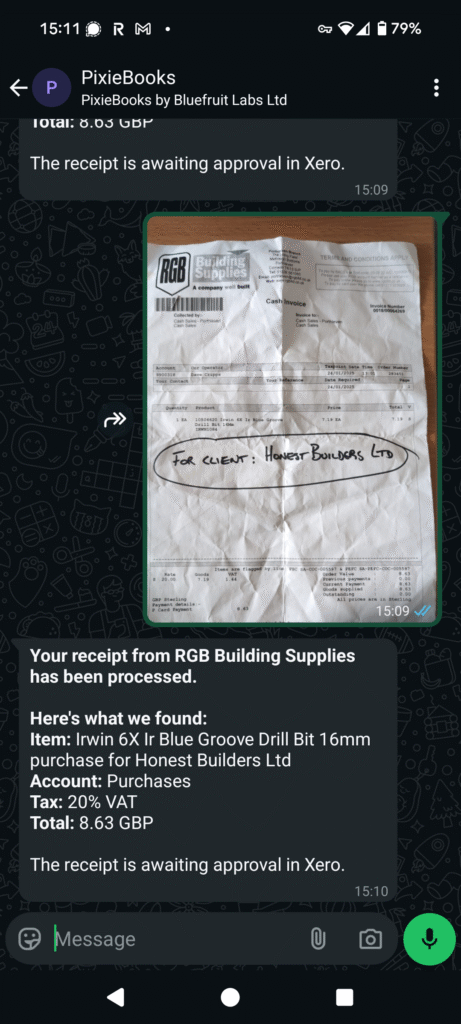
When you snap a photo of a receipt using WhatsApp, PixieBooks automatically scans the image and reads both the printed text and any clear handwritten notes. In more complex receipts, you may need to draw attention to your note, by circling underlining it.
Use It To:
- Clarify VAT context: e.g. “Takeaway” vs “Eat in” – useful if the receipt doesn’t specify.
- Tag client expenses: Write “Lunch with Client: ABC Ltd” to make client-specific costs crystal clear.
- Fill in missing details: If the receipt is torn or faded, jot down the missing item or amount before snapping it.
Why It Matters
Accountants and bookkeepers benefit from better context, more accurate categorisation, and fewer follow-up questions. That means less admin for you — and cleaner books for your business.
Any tips?
If you have your own PixieBooks tip you’d like to share, let us know – we’d love to hear them!