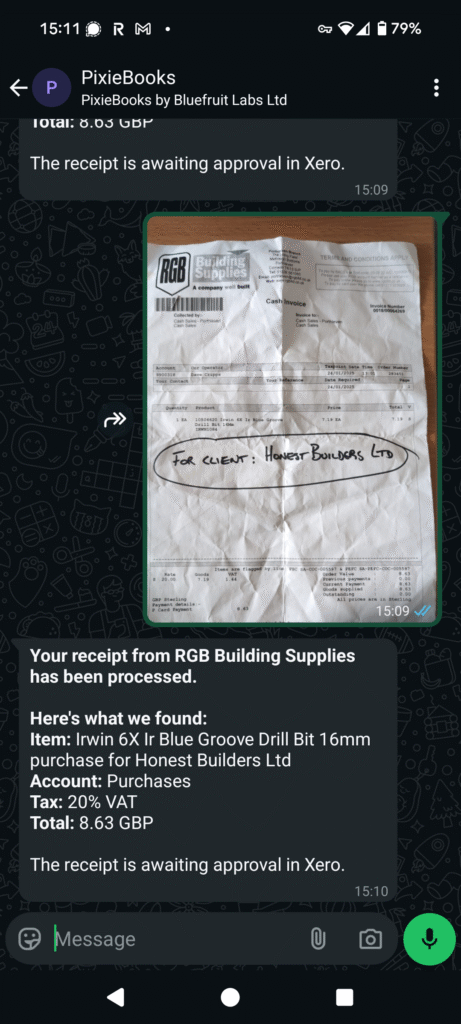
Welcome to PixieBooks – your AI-powered companion for processing receipts.
PixieBooks helps you stay on top of your bookkeeping and save time by automatically handling your receipts. Using advanced AI, PixieBooks processes receipts sent via email or WhatsApp and works with Xero to identify item descriptions, amounts, dates, and VAT.
PixieBooks also offers a Google Sheets integration, currently in beta, which allows receipts to be submitted via WhatsApp and stored directly in Google Sheets.
Key features
- Automatic receipt processing: Capture your receipts and send them to PixieBooks – the AI reads and codes them for you.
- Smart receipt rules: Create simple, plain-English prompts and PixieBooks automatically applies them to future receipts. Click here to learn more.
- Integration with Xero: PixieBooks connects directly to your Xero organisation and posts data in the background.
- VAT detection: VAT amounts are automatically recognised and the appropriate VAT code is applied.
- Reduced bookkeeping effort: Spend less time coding receipts and more time on higher-value work.
System requirements
- A Xero account to connect PixieBooks.
- A Google account to use our Sheets version (beta).
- A device with WhatsApp installed, so you can send PixieBooks photos of your receipts.
- A reliable internet connection to send and receive data.
- Optional: access to email as an alternative way to send receipts.
Permission requirements
Xero
To connect PixieBooks to a Xero organisation, the following permissions are required:
- Projects → Access set to Standard or Admin
- Business and accounting → Access set to Advisor or Standard
Google Sheets
- Personal Google account: No additional permissions are required.
- Google Workspace account: The account must not be Cloud Identity Free. Storage access is required in order to open and use the PixieBooks template.
Supported platforms
PixieBooks currently integrates with Xero and Google Sheets. Future updates will expand support to additional accounting platforms.
To stay informed about new features and updates, subscribe to our newsletter at
pixiebooks.com/newsletter
or follow us on social media at @pixiebooksbybluefruitlabs.